Introduction
This document describes Teya's Consumer Loans REST API (v3) which enables merchants to offer consumer loans through eCommerce websites and POS systems.
The API supports these integration patterns:
- Teya UI Integration - Customer is redirected to Teya's self-service portal to complete the loan application (eCommerce).
- POS Integration - Customer receives an SMS with a link to Teya's self-service portal (Point of Sale).
- eCommerce plugin Integration - Plugin for eCommerce.
Environments
Consumer Loans API v3 is a REST service communicating over HTTPS encrypted with TLS 1.2. All request and response bodies use JSON format.
| Environment | Base URL |
|---|---|
| Production |
https://services.borgun.is/clapi/v3/
|
| Test |
https://test.borgun.is/radgreidslur/clapi/v3
|
A username and password with access to the service is required (HTTP Basic Authentication). Contact Teya for access information at hjalp@teya.is or 560 1600.
Authentication
Contact Teya for access information at hjalp@teya.is or 560 1600.
All API requests require HTTP Basic Authentication. Include
the Authorization header
with Base64-encoded username:password credentials.
Authorization: Basic dXNlcm5hbWU6cGFzc3dvcmQ=
API v3
List of endpoints from the Consumer Loans API v3 are used for the eCommerce loan process:
-
List Payment Methods -
GET /online/payment- to display available payment options to the customer. -
Create Token (Web) -
POST /online/token/web- to create a token that authorizes temporary access to Teya's self-service portal. -
Create Token (SMS) -
POST /online/token/sms- to send an SMS with a loan URL and pre-register merchant information. -
Check Loan Status -
GET /online/status- to poll for loan process status. -
Validate Loan -
PUT /online/validate- to validate that the customer successfully created a loan. -
Cancel Loan -
PUT /online/cancel- to cancel the loan process. -
Loan Advertisement -
GET /helpers/advert?- Calculates information for product advertising purposes.
Create Token (Web)
Creates a token and returns it. The merchant uses this token to redirect the customer to Teya's self-service portal for eCommerce loan applications.
Request
POST /online/token/web
Content-Type: application/json
Parameters (JSON Body)
TokenRequest object.
Example Request
{
  "SocialSecurityNumber": "0101502479",
  "Email": "customer@example.is",
  "PhoneNumber": "8111111",
  "ProgressValidMinutes": 10,
  "TokenValidMinutes": 10,
  "LoanInformation": {
    "MerchantNumber": "9635422",
    "LoanTypeId": 23,
    "Amount": 121313,
    "Description": "Product purchase",
    "NumberOfPayments": 12,
    "FlexibleNumberOfPayments": true,
    "SuccessUrl": "https://www.webstore.is/order/success",
    "CancelUrl": "https://www.webstore.is/order/cancel"
  }
}
Response
Returns token as a string (64 characters).
Example Response
4PPURAkB9us9HR7rqGqY5ljN6T8L5Bidr4I7Y0UcbQhJJnXrnxKR5DAMhYnljjSX
HTTP Status Codes
| Code | Type | Description |
|---|---|---|
| 200 | string | Token returned |
| 400 | FailureResponse | Input validation error |
| 403 | FailureResponse | Merchant access denied |
| 500 | FailureResponse | Internal service error |
Create Token (SMS)
Creates a token and sends an SMS to the customer with a URL to Teya's self-service portal. Used for POS loan applications.
Request
POST /online/token/sms
Content-Type: application/json
Parameters (JSON Body)
TokenSMSRequest object.
Example Request
{
  "SocialSecurityNumber": "0101502479",
  "Email": "customer@example.is",
  "PhoneNumber": "8111111",
  "ProgressValidMinutes": 5,
  "TokenValidMinutes": 2,
  "LoanInformation": {
    "MerchantNumber": "9635422",
    "LoanTypeId": 24,
    "Amount": 64995,
    "Description": "Playstation 4",
    "NumberOfPayments": 12,
    "FlexibleNumberOfPayments": true,
    "SuccessUrl": "https://radgreidslur.saltpay.is/Pos/Success",
    "CancelUrl": "https://radgreidslur.saltpay.is/Pos/Cancel"
  }
}
Response
Returns token as a string (64 characters).
Example Response
4PPURAkB9us9HR7rqGqY5ljN6T8L5Bidr4I7Y0UcbQhJJnXrnxKR5DAMhYnljjSX
HTTP Status Codes
| Code | Type | Description |
|---|---|---|
| 200 | string | Token returned |
| 400 | FailureResponse | Input validation error |
| 403 | FailureResponse | Merchant access denied |
| 500 | FailureResponse | Internal service error |
List Payment Methods
Returns a list of available payment methods for a given amount and merchant. Returns an empty list if all payment options exceed the allowed APR.
Request
GET /online/payment?amount={amount}&merchantNumber={merchantNumber}
Parameters (Query String)
| Field | Type | Description |
|---|---|---|
| amount | decimal | Loan amount. |
| merchantNumber | string | The merchant ID. |
Example Request
GET /online/payment?amount=64995&merchantNumber=9635422
Response
Returns a list of PaymentMethodInfo objects.
Example Response
[
  {
    "loanTypeId": 23,
    "paymentName": "Raðgreiðslur án vaxta",
    "paymentInfo": "12 mánaða greiðsluáætlun án vaxta",
    "maxNumberOfPayments": 12,
    "logoUrl": "https://radgreidslur.saltpay.is/logo.png"
  },
  {
    "loanTypeId": 24,
    "paymentName": "Raðgreiðslur með vöxtum",
    "paymentInfo": "Allt að 36 mánaða greiðsluáætlun",
    "maxNumberOfPayments": 36,
    "logoUrl": "https://radgreidslur.saltpay.is/logo.png"
  }
]
HTTP Status Codes
| Code | Type | Description |
|---|---|---|
| 200 | a list of PaymentMethodInfo | List of payment methods returned |
| 400 | FailureResponse | Input validation error |
| 403 | FailureResponse | Merchant access denied |
| 500 | FailureResponse | Internal service error |
Validate Loan
Validates that a customer has successfully created an online loan. Called after receiving SUCCESS status from the Check Loan Status endpoint. The "RedirectUrl" field should contain the same value as "SuccessUrl" field from the Create Token endpoint, plus "token={token}"
Request
PUT /online/validate
Content-Type: application/json
Parameters (JSON Body)
ValidateRequest object.
Example Request
{
  "Token": "i73IkhjKDRtKTCABkPwleaep6YvuqVsVk9pyt5Pu7AZroiWBgAyldsGzqgNrpgpE",
  "RedirectUrl": "https://www.webstore.is/order/success?token=i73IkhjKDRtKTCABkPwleaep6YvuqVsVk9pyt5Pu7AZroiWBgAyldsGzqgNrpgpE",
  "MerchantNumber": "9635422"
}
Response
Returns ContractInfoCompact object if loan is valid.
Example Response
{
  "contractNumber": "608012",
  "authorizationNumber": "103145",
  "socialSecurityNumber": "0101502479"
}
HTTP Status Codes
| Code | Type | Description |
|---|---|---|
| 200 | ContractInfoCompact | Loan validated successfully |
| 400 | FailureResponse | Input validation error |
| 403 | FailureResponse | Merchant access denied |
| 422 | FailureResponse | Loan could not be validated |
| 500 | FailureResponse | Internal service error |
Cancel Loan
Cancels an online loan by setting its status to CANCELED. Can only be done if the current status is CREATED or INPROGRESS.
Request
PUT /online/cancel?token={token}&merchantNumber={merchantNumber}
Parameters (Query String)
| Field | Type | Description |
|---|---|---|
| token | string | Authentication token from token endpoint. |
| merchantNumber | string | The merchant ID. |
Example Request
PUT /online/cancel?token=i73IkhjKDRtKTCABkPwleaep6YvuqVsVk9pyt5Pu7AZroiWBgAyldsGzqgNrpgpE&merchantNumber=9635422
Response
Returns HTTP 200 with no body on success.
HTTP Status Codes
| Code | Type | Description |
|---|---|---|
| 200 | Empty | Loan canceled |
| 400 | FailureResponse | Input validation error |
| 403 | FailureResponse | Merchant access denied |
| 422 | FailureResponse | Cannot cancel loan in current status |
| 500 | FailureResponse | Internal service error |
Check Loan Status
Returns the current status of a loan application. Used by both eCommerce webstores and POS systems to poll for status changes.
Request
GET /online/status?token={token}&merchantNumber={merchantNumber}
Parameters (Query String)
| Field | Type | Description |
|---|---|---|
| token | string | Authentication token from token endpoint. |
| merchantNumber | string | The merchant ID. |
Example Request
GET /online/status?token=i73IkhjKDRtKTCABkPwleaep6YvuqVsVk9pyt5Pu7AZroiWBgAyldsGzqgNrpgpE&merchantNumber=9635422
Response
Returns one of the following status codes as a string.
Example Response
INPROGRESS
| Status Code | Description |
|---|---|
| CREATED | Loan access has been created. |
| INPROGRESS | Token has been used and borrower is in loan progress. |
| PENDING | Loan authorization is in progress. |
| PROGRESSEXPIRED | Loan progress expired and loan cannot be created. |
| TOKENEXPIRED | Token expired before being used. |
| SUCCESS | Loan has been successfully created. |
| FAILED | Loan could not be validated. |
| CANCELED | Borrower or POS canceled the loan process. |
HTTP Status Codes
| Code | Type | Description |
|---|---|---|
| 200 | string | Status returned |
| 400 | FailureResponse | Input validation error |
| 403 | FailureResponse | Merchant access denied |
| 500 | FailureResponse | Internal service error |
Helper: Get Loan Advertisement
Calculates key information for consumer loan to be displayed on merchant website for product advertising purposes.
Request
GET /helpers/advert?amount={amount}&loanTypeId={loanTypeId}&numberOfPayments={numberOfPayments}&merchantNumber={merchantNumber}
Parameters (Query String)
| Field | Type | Description |
|---|---|---|
| amount | decimal | The loan amount. |
| loanTypeId | int | Loan contract type id from List Payment Methods. |
| numberOfPayments | int | Number of payments the loan is divided into. |
| merchantNumber | string | The merchant ID. |
Response
Returns LoanAdvert object.
Example Response
{
  "aprRatio": 12.5,
  "interestRate": 6.9,
  "loanFeeRate": 1.5,
  "numberOfPayments": 12,
  "totalPayment": 68750,
  "amount": 64995,
  "paymentFee": 195,
  "averagePayment": 5729,
  "created": "2026-03-16T00:00:00",
  "firstPayment": "2026-05-01T00:00:00",
  "lastPayment": "2027-04-01T00:00:00"
}
HTTP Status Codes
| Code | Type | Description |
|---|---|---|
| 200 | LoanAdvert | Loan advert returned |
| 400 | FailureResponse | Input validation error |
| 403 | FailureResponse | Merchant access denied |
| 422 | FailureResponse | Cannot cancel loan in current status |
| 500 | FailureResponse | Internal service error |
Objects
TokenRequest
Used for Create Token (Web).
| Field | Type | Required | Description |
|---|---|---|---|
| LoanInformation | OnlineLoan | Yes | The online loan information. |
| SocialSecurityNumber | string | No | Customer social security number (10 digits). |
| string | No | Customer email address. | |
| PhoneNumber | string | No | Customer mobile phone number (7 digits, starts with 6, 7 or 8). |
| ProgressValidMinutes | int | Yes | How long customer has to finish loan process (max 40 min). |
| TokenValidMinutes | int | Yes | How long the redirect URL is valid (max 120 min). |
TokenSMSRequest
Used for Create Token (SMS).
| Field | Type | Required | Description |
|---|---|---|---|
| LoanInformation | OnlineLoan | Yes | The online loan information. |
| SocialSecurityNumber | string | No | Customer social security number (10 digits). |
| string | No | Customer email address. | |
| PhoneNumber | string | Yes | Customer mobile phone number (7 digits, starts with 6, 7 or 8). |
| ProgressValidMinutes | int | Yes | How long customer has to finish loan process (max 40 min). |
| TokenValidMinutes | int | Yes | How long the SMS URL is valid (max 120 min). |
OnlineLoan
Loan information object used in TokenRequest and TokenSMSRequest.
| Field | Type | Required | Description |
|---|---|---|---|
| MerchantNumber | string | Yes | The merchant number (7 digits). |
| LoanTypeId | int | Yes | Loan contract type id from List Payment Methods. |
| Amount | decimal | Yes | Loan amount in ISK (1 - 2,999,000). |
| Description | string | Yes | Product description. |
| NumberOfPayments | int | Yes | The exact or maximum number of payments (1 - 120). |
| FlexibleNumberOfPayments | bool | Yes | Allow customer to choose number of payments up to NumberOfPayments. Cannot go lower than APR minimum. |
| SuccessUrl | string | Yes | Redirect URL for successfully created loan. |
| CancelUrl | string | Yes | Redirect URL if customer cancels the loan process. |
ValidateRequest
Used for Validate Loan.
| Field | Type | Required | Description |
|---|---|---|---|
| Token | string | Yes | Authentication token from token creation endpoint. |
| RedirectUrl | string | Yes | Customer redirect URL from Teya consumer loan website. |
| MerchantNumber | string | Yes | The merchant ID (7 digits). |
ContractInfoCompact
Returned from Validate Loan.
| Field | Type | Description |
|---|---|---|
| ContractNumber | string | Loan contract number/id. |
| AuthorizationNumber | string | Credit card authorization number. |
| SocialSecurityNumber | string | Borrower social security number. |
PaymentMethodInfo
Returned from List Payment Methods.
| Field | Type | Description |
|---|---|---|
| LoanTypeId | int | Unique ID of loan contract type. |
| PaymentName | string | Name of payment method. |
| PaymentInfo | string | Information about payments. |
| MaxNumberOfPayments | int | Maximum number of payments allowed for payment method. |
| LogoUrl | string | Raðgreiðslur logo URL. |
LoanAdvert
Returned from Get Loan Advertisement.
| Field | Type | Description |
|---|---|---|
| AprRatio | decimal | Annual percentage rate. |
| InterestRate | decimal | Loan interest rate. |
| LoanFeeRate | decimal | Loan fee percent rate. |
| NumberOfPayments | int | Loan payment count. |
| TotalPayment | decimal | Total amount to be paid. |
| Amount | decimal | Loan principal amount. |
| PaymentFee | decimal | Loan payment fee. |
| AveragePayment | decimal | Loan average amount per payment. |
| Created | DateTime | Loan calculation date. |
| FirstPayment | DateTime | Loan first payment date. |
| LastPayment | DateTime | Loan last payment date. |
FailureResponse
Returned for HTTP 400 and 500 responses.
| Field | Type | Description |
|---|---|---|
| ErrorId | string | Teya error ID for HTTP 400 or 500 responses. |
| Message | string | Reason for failure. |
Example Response
{
  "errorId": "",
  "message": "The field Amount must be between 1 and 2999000."
}
eCommerce Loans
Introduction
This document describes Teya's eCommerce loan integration using the Consumer Loans API v3 (REST). It enables merchants to offer consumer loans through an eCommerce website. Customers apply for a loan during checkout, confirm their identity via electronic identification, and finalize the loan in one step.
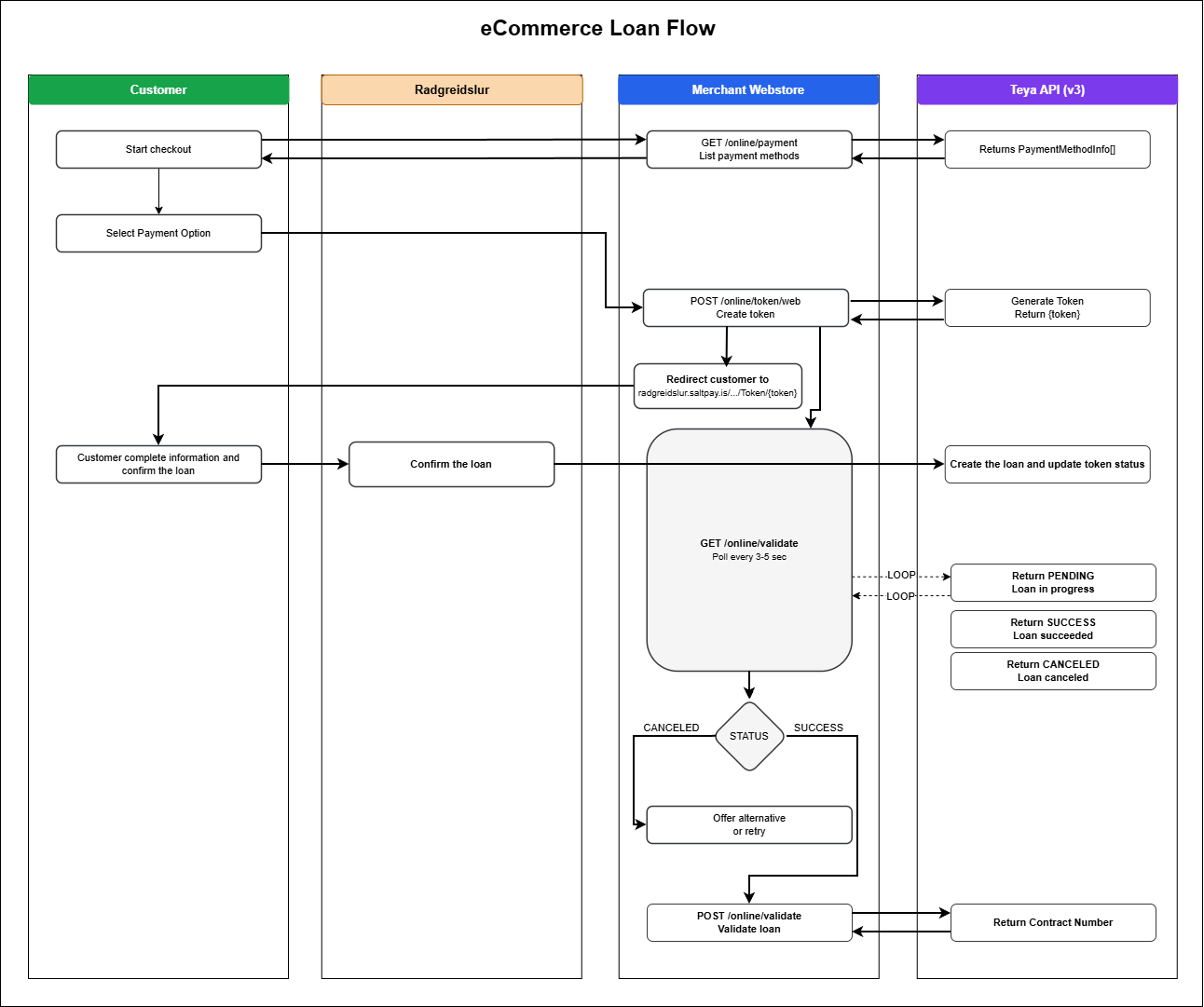
eCommerce loan process
The eCommerce loan is a process between the merchant's webstore and Teya's consumer loan service.
-
Customer adds products to cart and proceeds to checkout.
Call
GET /online/payment(List Payment Methods) to display available payment options. Customer enters personal information and selects a payment option. - Merchant's webstore stores information about the product(s), customer, and any other relevant data.
-
Create a token for the customer by calling
POST /online/token/web(Create Token). -
Redirect the customer to Teya's self-service portal using
the token:
https://radgreidslur.saltpay.is/Umsokn/Login/Token/{token} -
The webstore goes into waiting for payment mode
and
calls
GET /online/status(Check Loan Status) every 3-5 seconds to monitor loan progress. - Customer provides credit card information and completes the loan authorization process on Teya's portal.
-
a) The webstore receives SUCCESS status
from
GET /online/status. The webstore callsPUT /online/validate(Validate Loan) to validate the loan and receive contract details (ContractNumber, AuthorizationNumber, SocialSecurityNumber).
b) The webstore receives CANCELED status. Merchant can offer another payment option or allow the customer to try again. - Display success text along with delivery/pickup information for the customer.
Process deviations
-
The webstore calls
PUT /online/cancel(Cancel Loan) to cancel the process. Loan status updates to CANCELED. - Status is set to TOKENEXPIRED when the redirect URL has not been opened within the time set by TokenValidMinutes. The webstore must create a new token and restart the process.
- Status is set to PROGRESSEXPIRED if the customer opened the URL but did not finish or cancel within ProgressValidMinutes. The webstore must create a new token and restart.
-
Status is set to FAILED if
PUT /online/validate(Validate Loan) is not successful. The response will provide failure details.
Loan advertisement
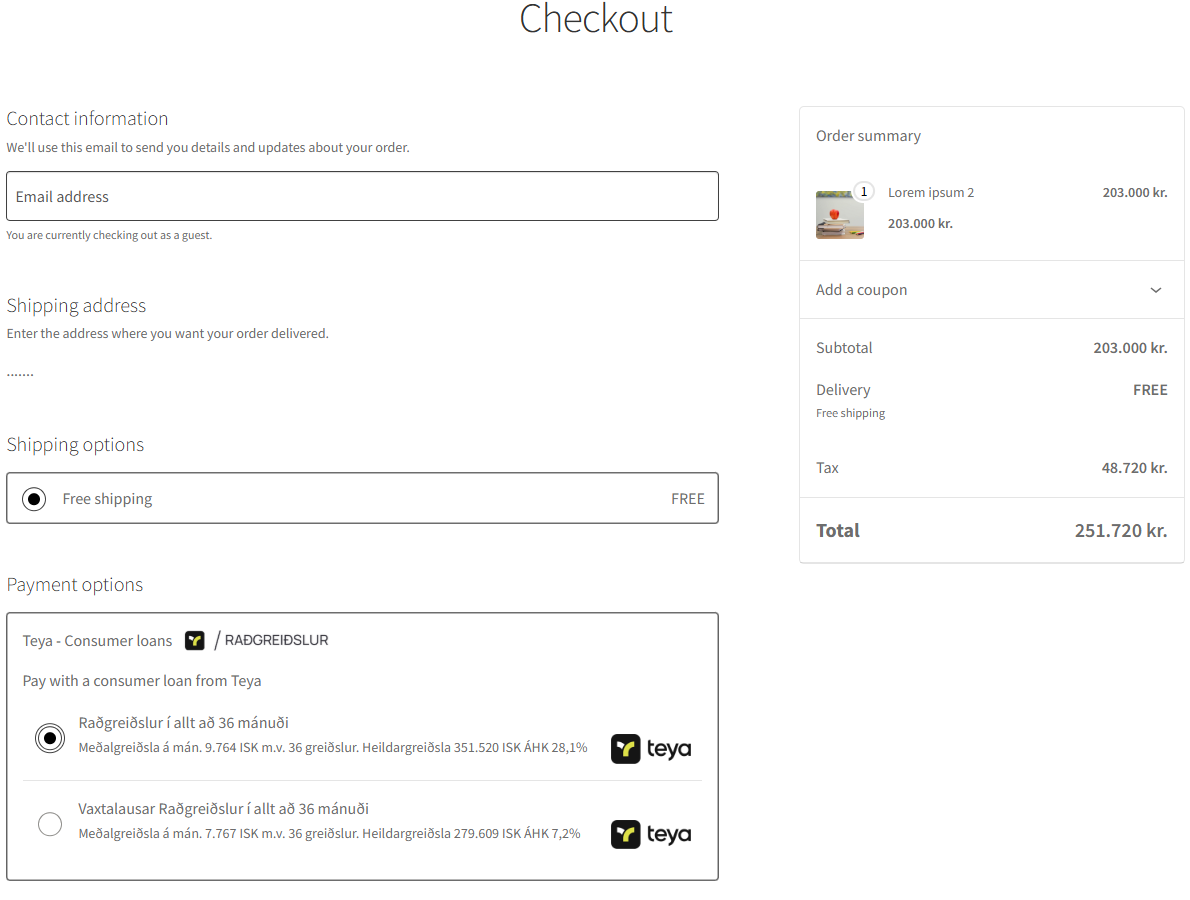
Most webstores adverties loan ratings that customer can have for all products that qualify. The Consumer Agency requires that certain information is shown. That can be done by calling the Consumer Loans API webservice LoanAdvert method and showing key information along with product price as shown in image 1.

Image - 1 Loan advertisement example for a product in an eCommerce website
POS Loans
Introduction
This document describes Teya's POS loan integration using the Consumer Loans API v3 (REST). It enables merchants to offer consumer loans through point of sale systems.
The POS system selects Teya consumer loan as payment. The customer receives an SMS with a URL to self-service a loan application on their mobile device. The POS system polls for status updates until the loan is approved or canceled.
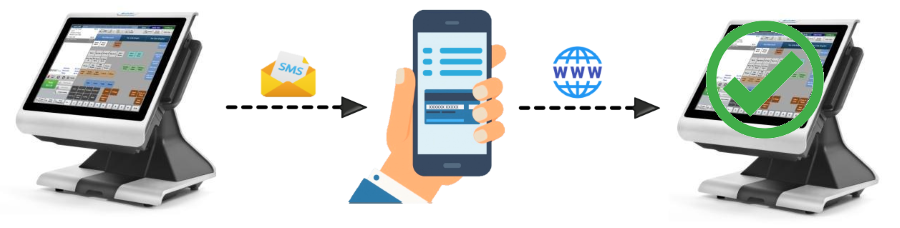
Image 1 - Overview of POS loan process from merchant to customer mobile device.
POS loan process
-
Customer products have been scanned into POS system and
consumer loan
is selected as payment.
GET /online/payment(List Payment Methods) is called to display available payment options. Merchant selects the payment option the customer prefers. -
Merchant enters customer phone number and presses Send SMS.
POS system calls
POST /online/token/sms(Create Token (SMS)). Loan status is set to CREATED and customer receives SMS with URL granting temporary access to Teya's loan application. -
POS system goes into waiting for payment mode
and
calls
GET /online/status(Check Loan Status) every 3-5 seconds to monitor loan progress. - Customer opens the URL and loan status is set to INPROGRESS. Customer applies for a loan confirming their identity with electronic identification.
-
a) Customer starts loan evaluation and status updates
to PENDING.
Loan is successfully created and status updates to SUCCESS.
b) Customer is not approved or presses Cancel. Loan status updates to CANCELED. -
a) POS system receives SUCCESS status
from
GET /online/status. The system callsPUT /online/validate(Validate Loan) to validate the loan and receive contract details (e.g., ContractNumber) to store as a reference ID.
b) POS system receives CANCELED status. Merchant can choose another payment option or try again.
Process deviations
-
POS system calls
PUT /online/cancel(Cancel Loan) to cancel the process. Loan status updates to CANCELED. -
Status is set to TOKENEXPIRED when
the SMS
URL has not been opened within the time set by TokenValidMinutes (set
when calling
POST /online/token/sms). The POS system must issue a new SMS and restart the process. - Status is set to PROGRESSEXPIRED if the customer opened the URL but did not finish or cancel within ProgressValidMinutes. The POS system must issue a new SMS and restart.
-
Status is set to FAILED if
PUT /online/validate(Validate Loan) is not successful. The response will provide failure details.
Plugins
Teya Plugins
Teya provides plugins to eCommerce loans. Merchants can get up and running quickly with minimal integration effort.
WooCommerce-Plugin
You will find the Consumer loans payments via Teya for Woocommerce here.
Installation
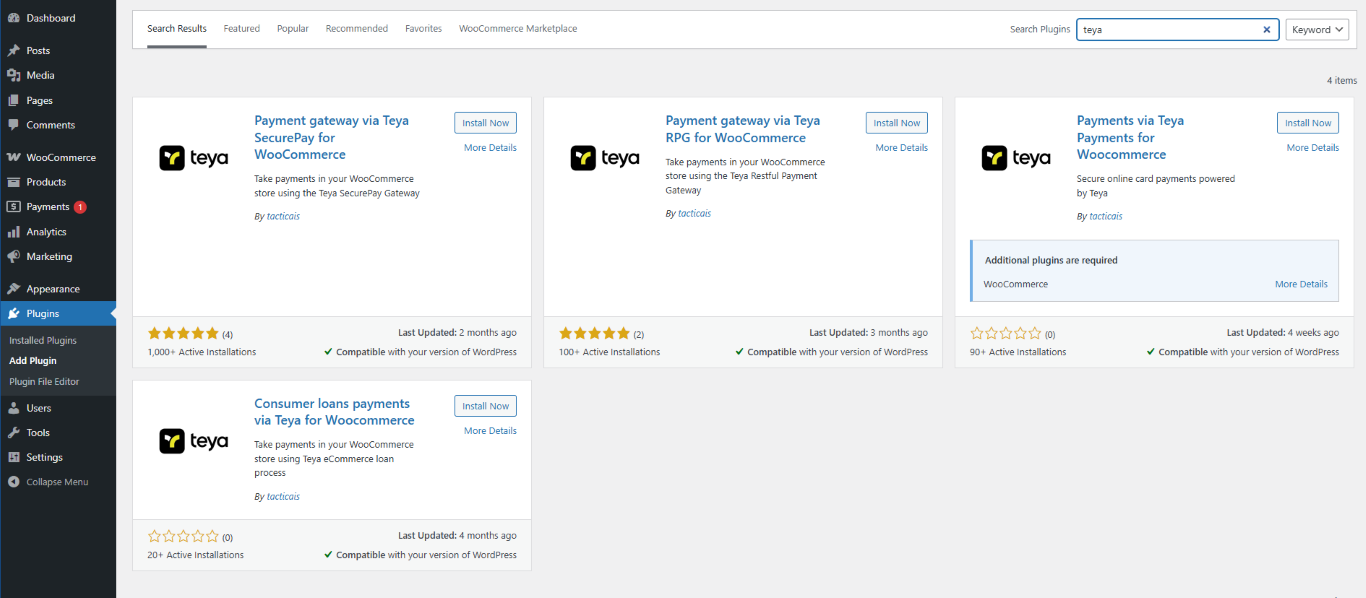
To install the Consumer Loans WooCommerce plugin please follow these steps in the WordPress/WooCommerce admin interface.
Find the Plugins secion on the menu bar to the left and click Add New. Then search for teya at the top of the screen. Select the "Consumer loans payments via Teya for Woocommerce" plugin and click the Install now button.
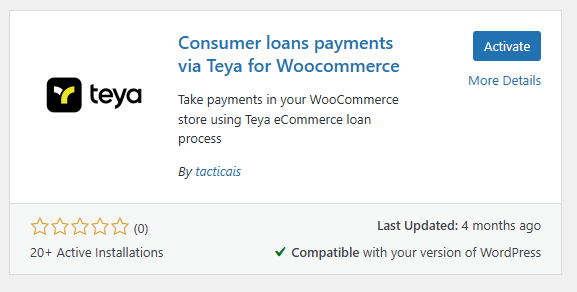
When the plugin has successfully installed, click Activate.
The installation is now complete.
Enable the plugin
To connect the WooCommerce plugin to the test environment of the Consumer Loans please follow these steps. Merchant Id, Payment Gateway Id and Secret Key for use in the testing environment is provided by Teya via email.
On the menu bar on the left side in WordPress/WooCommerce admin interface, navigate to WooCommerce -> Settings -> Payments
Find the newly added Teya - Consumer Loans plugin and click Manage
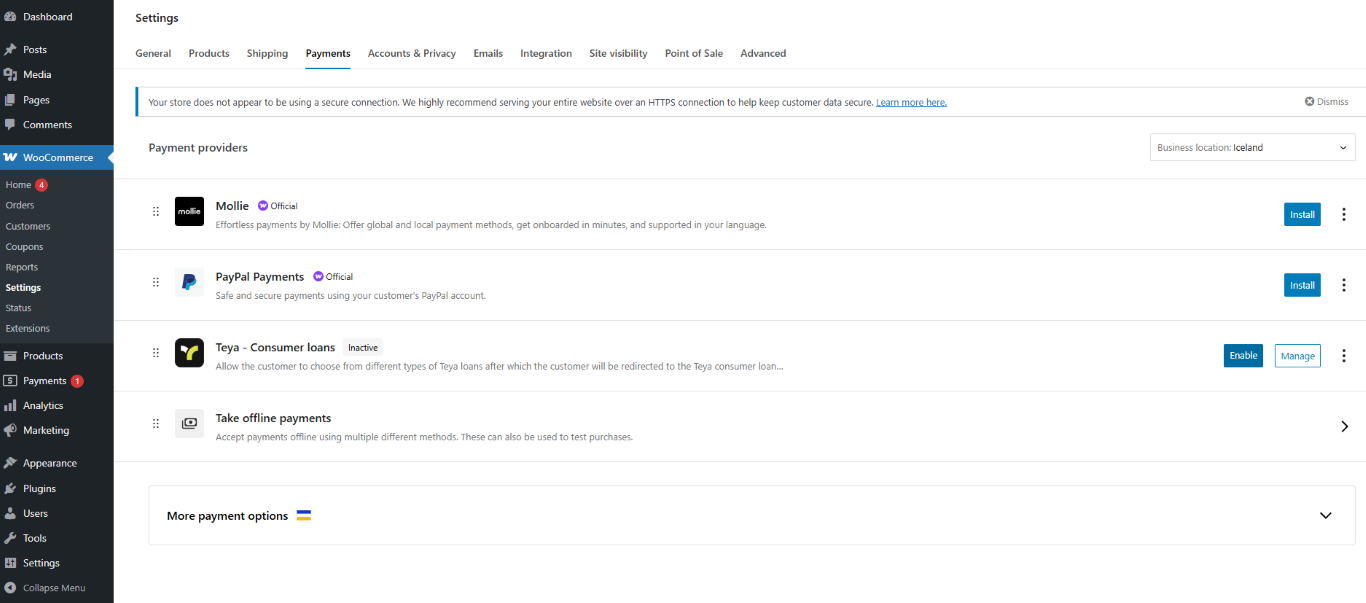
Enable the plug-in and enter the Merchant number, Username and Password, provided by Teya. It‘s always recommended to start in test environment before putting the option live to your customers, hence we recommend creating one loan in Test Mode (with the test environment details provided by Teya).
Title and Description of the plugin is automatically filled in as per the screenshot but can be adjusted to your liking.
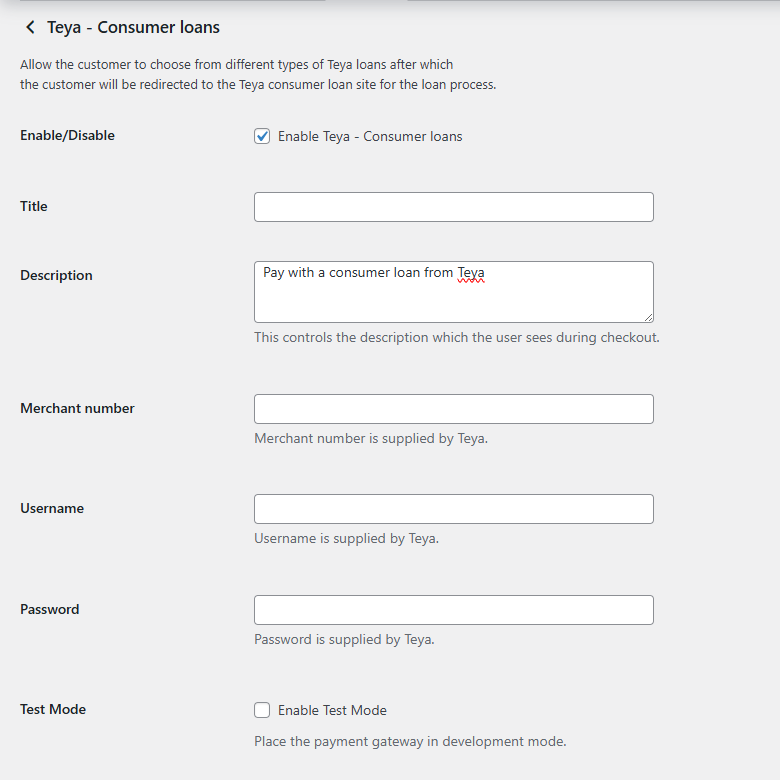
If you have entered all the fields as shown above, click Save Changes and you‘re ready to use the loan plug-in via your website in WooCommerce.
Remember to disable the Test Mode AND change the Merchant Number, Username and Password with your production credentials, to ensure that loans are created on your merchant contract with Teya. These details are provided by the Teya support team via hjalp@teya.com or 560 1600..
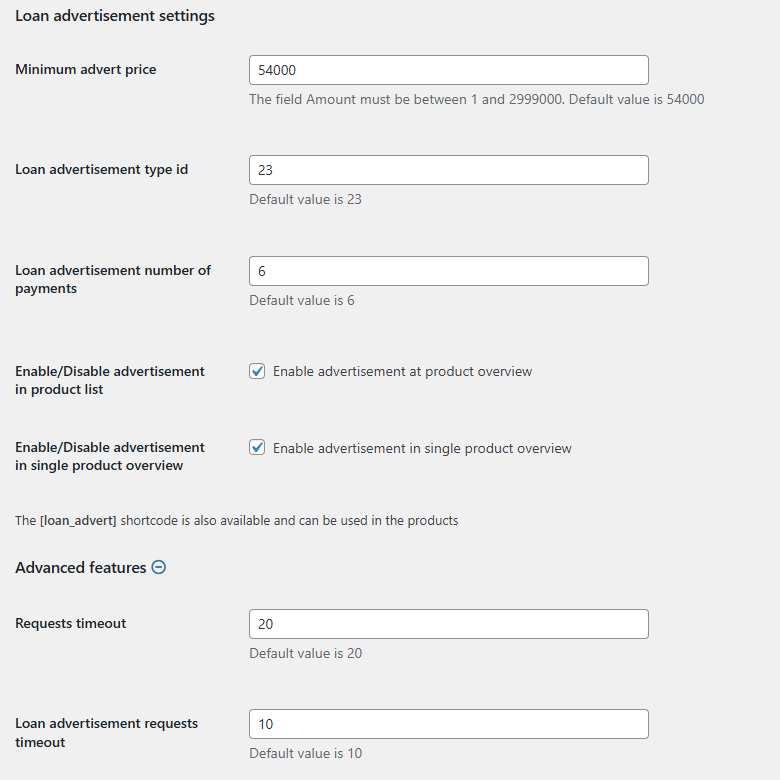
Loan Advertisement settings
The Loan advertisement settings controls which products the loan option will show up for. There are default values chosen in this section, which we recommended to keep as it fits with the minimum of a standard interest loan (for example if you lower the amount, customers might try to take a loan with an amount which is too low according to the APR Ratio/ÁHK (Árleg hlutfallstala kostnaðar) and will then be declined in the loan application form on the customer‘s end.
If you prefer that a specific loan advertisement is not shown on the products on your website (for those that do meet the criteria of the loan advertisement settings), you can disable the advertisement in product list and/or in single product overview. More customization is also availble with the [loan_advert] shortcode and can be used in the products section of WooCommerce if desired. Note: Loan advertisement visibility differs between the different WooCommerce themes, you can customise this feature to fit your current theme to your liking.